
Your Acatudy subscription: plans, prices, invoices and canceling
Compare plans, see what you pay in USD or EUR, upgrade or switch to annual billing, download invoices, cancel or resume, and know what happens if a payment fails. The Free plan never expires while you use it.
On this page
In this topic 7
- Your Acatudy subscription: plans, prices, invoices and canceling
- Storage and plan limits: what counts, where to see it and how to free up space
- Keep your account secure: passwords, sessions and signing out
- Privacy, cookies and student data (GDPR): what Acatudy does for you
- API tokens: connect your store or website, renew and revoke
- Backups: what your plan includes and how to restore your academy
- Trash: restore deleted questions, topics, units and exams
In this guide
- Plans, limits and prices (monthly and annual).
- Which currency you're charged in and why.
- Upgrade, switch to annual or move to the Free plan.
- Invoices, card changes, canceling and failed payments.
This guide is about your academy's subscription to Acatudy. To charge your students, see Sell access to your courses with Stripe.
Plans and prices
Every academy starts on the Free plan. It has no time limit and doesn't need a card: you can stay on it as long as you like and upgrade when you need more room.
| Plan | Monthly (USD) | Annual (USD) | Monthly (EUR) | Annual (EUR) |
|---|---|---|---|---|
| Free | $0 | $0 | €0 | €0 |
| Basic | $39 | $374 | €35 | €336 |
| Professional | $75 | $720 | €70 | €672 |
| Institutional | $115 | $1,104 | €109 | €1,046 |
Annual billing costs 12 months minus 20%. Prices don't include taxes: sales tax or VAT, if any, is calculated by Stripe at checkout from your tax details.
What each plan includes
| Free | Basic | Professional | Institutional | |
|---|---|---|---|---|
| Students | Unlimited | Unlimited | Unlimited | Unlimited |
| Practice-bank questions | 100 | 1,000 | 10,000 | Unlimited |
| Storage | 10 GB | 25 GB | 75 GB | 200 GB |
| Courses | 1 | 3 | 10 | 20 |
| New exams per month | 1 | Unlimited | Unlimited | Unlimited |
| Custom domains | — | 1 | 1 | 1 |
| Assignments | — | ✓ | ✓ | ✓ |
| Files, ranking, certificates, community | — | — | ✓ | ✓ |
| Full Website Builder, email marketing, coupons, live classes | — | — | ✓ | ✓ |
| Fee on your students' payments | 5% | 2% | 1% | 0% |
| Support response time | 48 h | 48 h | 24 h | 24 h |
How usage is counted (for example, which files count toward storage) is explained in Storage and plan limits.
Which currency you pay in
- Euros if your tax country is in the EU or EEA, Switzerland, the United Kingdom, Andorra, Monaco, San Marino, Vatican City, Montenegro or Kosovo.
- US dollars everywhere else, including the United States and Latin America.
The currency is decided by the country in your tax details. Once you have a subscription or an invoice, it stays in that currency, so check your country before your first payment. My subscription always shows prices in the currency you'll be charged.
Upgrade or change your plan
-
Complete your tax details
Stripe needs them for the invoice. If they're missing, My subscription shows "To subscribe to a plan you must first complete your tax details." with a Complete tax details button. Fill in account type, name or company name, tax ID (EIN, VAT…), country and address, then click Save and continue.
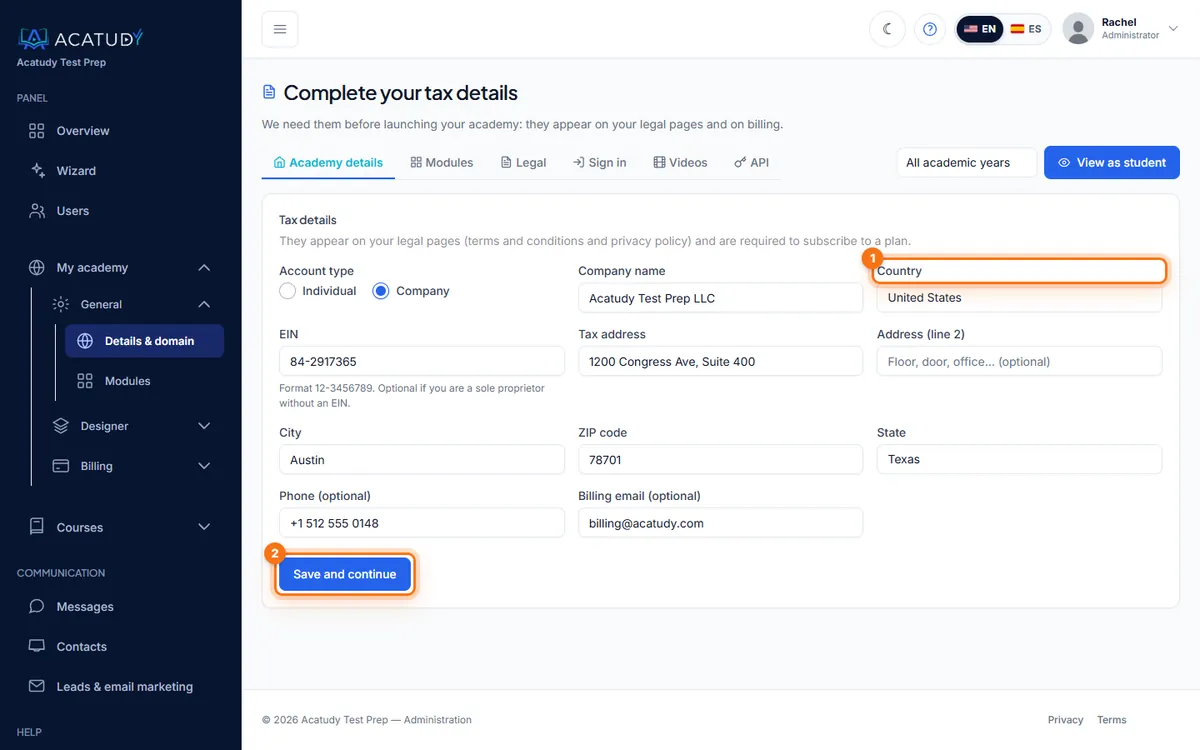
Tax details: the country decides your billing currency. -
Open My subscription
Go to My academy → Billing → My subscription. On the left you see Your plan with your usage and Current status; on the right, Change plan with every plan and its price.
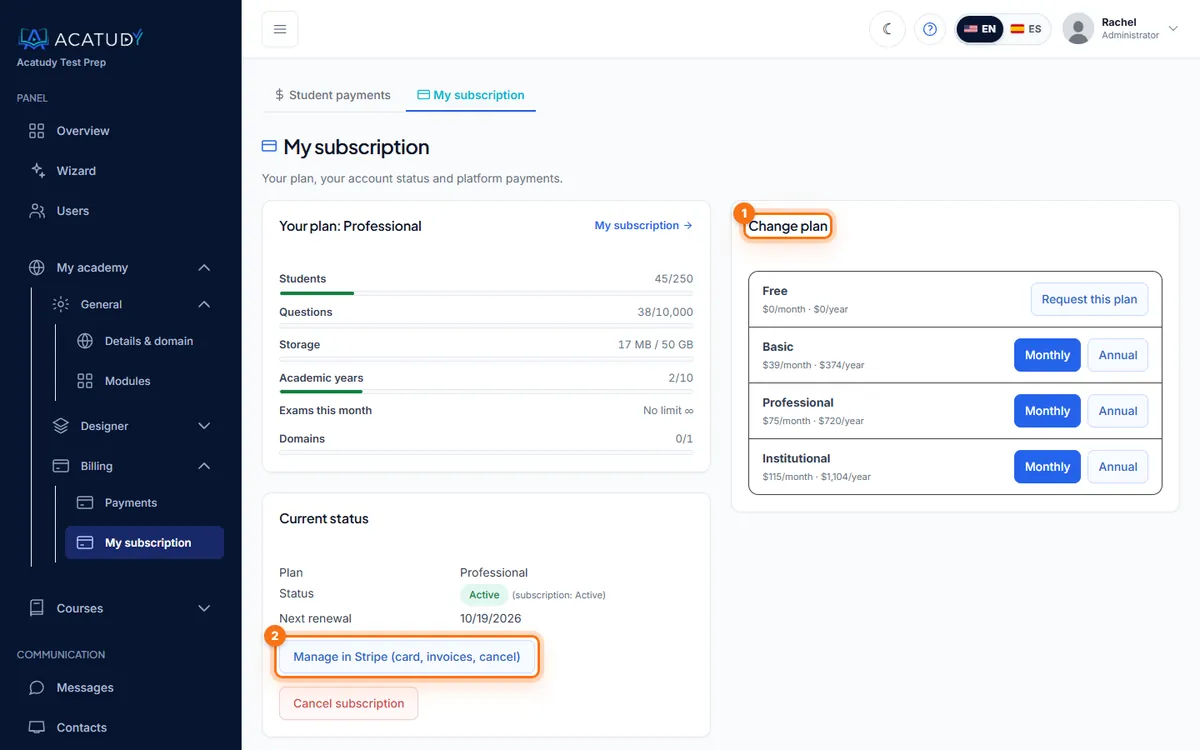
My subscription: usage on the left, plans on the right. -
Click Monthly or Annual on the plan you want
You go to Stripe's secure checkout. The new plan, its limits and its modules apply as soon as Stripe confirms the payment.
Changing plans when you already pay
When you buy a different plan or interval, your previous subscription is canceled at that moment and the unused time is credited to your Stripe balance, which is deducted from your next invoices. You're never charged twice for the same period.
Move to a smaller plan or to Free
Nothing is deleted when you move down. If your usage is above the new limits (for example 140 students on Basic), everything keeps working, but you can't add more until you're under the limit. Modules and features the new plan doesn't include are turned off (not just hidden from the menu). Your module settings are kept: when you move back to a plan that includes them, the modules you had on come back on their own.
The Free plan doesn't go through Stripe: click Switch to Free on the Free row. If you pay for a plan, it works just like canceling (see below); if you have no paid subscription, the switch is immediate.
Invoices, card and receipts
Click Manage in Stripe (card, invoices, cancel) in My subscription. Stripe's billing portal opens, where you can update your card, download every invoice as a PDF and see upcoming charges. The button appears once you've paid for a plan.
Seven days before each renewal we email you a reminder ("Your subscription renews on…"), unless you've canceled.
Cancel or resume
When you cancel, your academy is never paused and nothing is deleted: it always ends up on the Free plan. What changes is when:
| When you cancel | What happens |
|---|---|
| Within the 14-day withdrawal period after subscribing, without active use (any academy) | We refund everything you paid and your academy moves to the Free plan right away. |
| Within the 14 days but with active use | No refund: you keep your plan until the end of the paid period and then move to Free. If you're a consumer in the EU, EEA, UK or Switzerland, we refund the unused part of the period (or everything, if you didn't ask for the plan to start right away at checkout) and you move to Free right away. |
| After the 14 days | You keep your plan until the end of the paid period (month or year) and move to the Free plan that day. The current period isn't refunded. |
What counts as active use
Refunds are for academies that haven't really started using the platform yet, because using it takes up resources. When you cancel, your academy has made active use if it's over any of the thresholds of the plan you're canceling:
| Plan | Students | Questions | Subjects | Uploaded files |
|---|---|---|---|---|
| Basic | More than 5 | More than 50 | More than 2 | More than 50 MB |
| Professional | More than 10 | More than 100 | More than 3 | More than 200 MB |
| Institutional | More than 20 | More than 200 | More than 5 | More than 500 MB |
On every plan, having your website published on a verified custom domain also counts as active use. The full details are in the Refund policy.
When you subscribe you'll see a checkbox to ask for your plan to start right away; it's required to pay. In My subscription, before you cancel, you'll see whether you get a refund and, if not, exactly which threshold you're over.
Renewals don't restart the 14-day period: it counts from when you subscribed to that plan.
-
Click Cancel subscription
In My subscription, the note under the button tells you which case applies. Within the period and without active use, the prompt reads "Cancel your subscription? You're within the withdrawal period: we'll refund what you paid and your academy will move to the Free plan right away."; otherwise, "Cancel your subscription? You'll keep your plan until the end of the period you've paid for, and then your academy will move to the Free plan." In that case the status shows Canceled — moves to the Free plan on and the date.
-
Changed your mind? Click Resume subscription
While you still have your plan you can undo the cancellation: the subscription renews as usual.
What changes on the Free plan
- Nothing is deleted: courses, students, questions, grades and files stay visible and working.
- If you're over a Free plan limit (for example, 35 active students out of 20), the panel tells you ("Your academy is on the Free plan and over its limit for students (35 / 20)") and won't let you add more until you're under the limit or back on a paid plan.
- Modules and features from higher plans (full Website Builder, email marketing, live classes, your academy's backups…) are turned off until you subscribe again.
- The Free plan doesn't include a custom domain: your website is shown at youracademy.acatudy.com again, and visitors to your domain are sent there. The domain isn't deleted: it works again as soon as you choose a plan that includes it.
We also email you when it happens. If you cancel from the Stripe portal, the plan also moves to Free when it ends, but the withdrawal-period refund is only automatic from My subscription.
If a payment fails
- We email you right away ("We could not charge your subscription") with an Update payment method button. Stripe also retries the charge.
- You have a 72-hour grace period. Admins see a Payment pending banner across the panel; students notice nothing.
- We remind you when there are less than 24 hours left and in the final hour.
- If the payment goes through during the grace period, the notice disappears and your billing cycle doesn't change.
- If it still hasn't been charged after 72 hours, we cancel the subscription and your academy moves to the Free plan (it's never paused and nothing is deleted). To get your plan back, subscribe again in My subscription.
Frequently asked questions
Does the Free plan expire?
No. It has no end date and doesn't ask for a card. You only pay if you choose a paid plan.
What happens if nobody uses my Free academy?
To free up resources, a Free plan academy where nobody (admins, teachers or students) signs in for 6 months is closed and its data is permanently deleted. Before that, we email the owner twice: after 5 months ("Your academy … will be closed on … unless you sign in") and one week before the date. Signing in is enough to keep it: the countdown starts over. Academies on a paid plan are never closed for inactivity, and the certificates you issued stay verifiable.
Can my teachers see or change the subscription?
No. Billing, plans and payments are only visible to the academy owner and admins.
Can I get a refund or fix an invoice?
If you cancel within the 14-day withdrawal period and haven't made active use of the platform, the refund is automatic (see Cancel or resume). Duplicate charges, invoices with wrong details and any other case are handled by a person: open a ticket in Help → Support with the Billing and plan category.
Can my academy be paused because of the subscription?
No. When you cancel, when the paid period ends or if a payment can't be collected, your academy moves to the Free plan and keeps working.
Follow this guide in your own academy
Create it free in a couple of minutes and keep your admin panel open next to this guide.
Open a ticket from Help → Support in your panel: we reply within 24–48 h depending on your plan.