
Migrate from Moodle by importing your .mbz course backups
For academies and schools that built their courses in Moodle and want a simpler platform with their own website and payments, without rebuilding every unit, file and quiz by hand.
Start on the Free plan: it never expires and needs no credit card. Upgrade whenever you need more.
In short
Acatudy imports Moodle course backups (.mbz files from Moodle 3.x and 4.x). Each course becomes a subject and each section a unit; files, folders, links, pages, assignments and quizzes come across, and you see a preview of what will be imported and what will be skipped before anything is saved. Students can be imported too, without passwords.
What comes across
| In Moodle | In Acatudy |
|---|---|
| Course | Subject (in the course you choose) |
| Section | Unit |
| File and folder | Resources; MP4 and WebM files become course videos |
| URL | Link resource |
| Page, label and book | Text of the unit |
| Assignment | Assignment with its files, maximum grade or pass/fail, and start date |
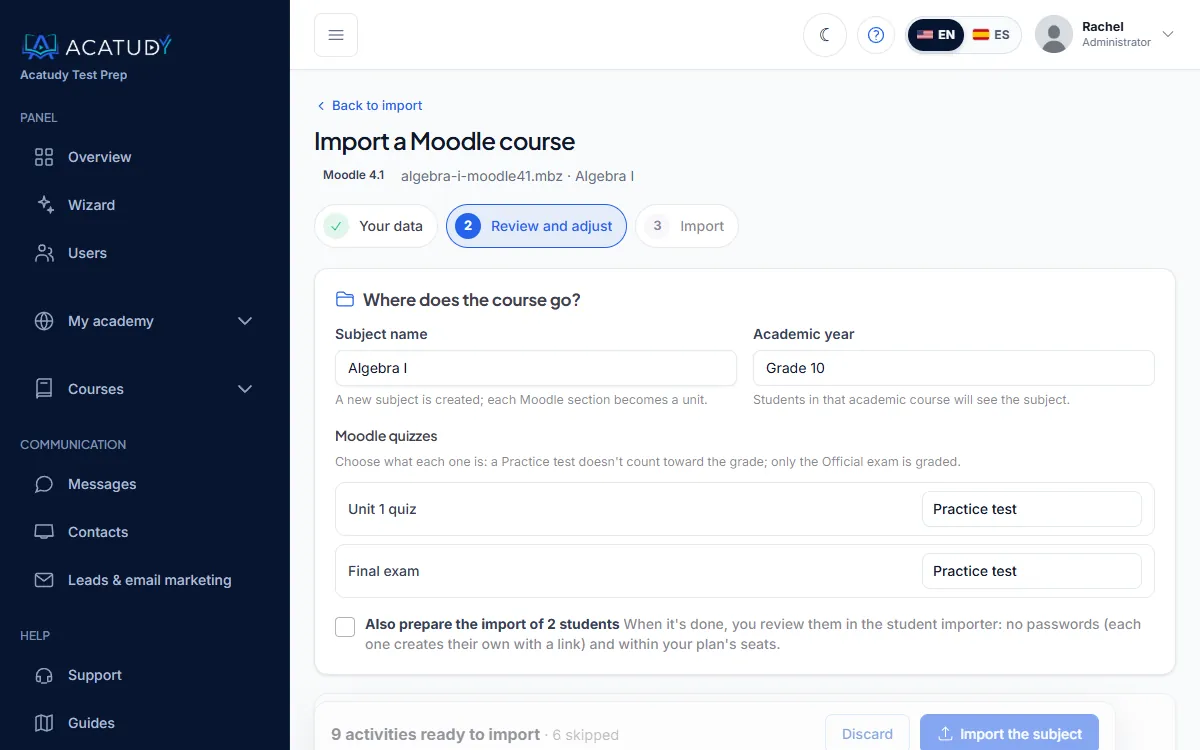
| Quiz | Practice test or official exam (you choose), with its time limit, attempts, opening date and supported questions |
| Users (if the backup includes them) | A student import batch you review before applying. Passwords are never imported |
What does not come across
Some Moodle activities have no equivalent in Acatudy and are listed as skipped in the preview, with the reason:
- Forums, SCORM and H5P packages, external tools (LTI), workshops, glossaries, wikis, chats, surveys and databases.
- Random questions and question types Acatudy does not support (such as matching, ordering or calculated questions).
- Student grades, submissions and activity history.
Supported question types are multiple choice, true/false, short answer, numerical and essay. Question categories become topics and subtopics.
Limits and safety
- Backups up to 2,000 MB, in the .mbz format Moodle produces (tar.gz or zip).
- Large backups are uploaded in chunks and processed in the background.
- Every archive is unpacked in a protected way: file count, size and compression ratio are checked before extraction.
- Your plan's limits for storage, questions and exams still apply; anything over a limit is shown as skipped in the preview.
- If a course was already imported, Acatudy warns you; importing it again creates a separate copy and never overwrites your changes.
How to migrate a course
-
Back up the course in Moodle
In your Moodle course, create a backup and download the .mbz file. Include users only if you want to bring students over.
-
Upload it to Acatudy
In your academy, open the import page and choose the Moodle option, then upload the .mbz file.
-
Review and adjust
Pick the subject name and course, decide whether each quiz is a practice test or an exam, and check what will be imported or skipped.
-
Import and check
Import the subject, open it as a student would and adjust anything you want.
-
Bring in students
If the backup had users, review the prepared student batch and apply it. Each student creates their own password from a link.
Frequently asked questions
Which Moodle versions are supported?
Course backups from Moodle 3.x and 4.x, in the standard .mbz format.
Can I import a whole Moodle site at once?
Import works course by course: each .mbz backup becomes one subject. Repeat the process for each course you want to bring over.
Will my students' grades come across?
No. Grades, submissions and activity history stay in Moodle; export them from there if you need a record. In Acatudy students start with a clean gradebook.
Can I import only the question bank?
Yes. Questions exported from Moodle in XML can be imported directly into your question bank, along with CSV, Excel, GIFT and Aiken files.
Is there a size limit?
Up to 2,000 MB per backup, plus your plan's storage limit. Big video files are usually the reason a backup is large.
Moodle is a registered trademark of Moodle Pty Ltd. Acatudy is not affiliated with or endorsed by Moodle Pty Ltd.
Bring your Moodle courses with you
Create your academy for free and import your first .mbz backup.